
Now Playing
Artwork, track, progress and controls for Apple Music and Spotify, and, with the experimental System Now Playing, YouTube or any other site in your browser. The island even picks up the colors of the cover.
Free during the beta · What’s new in 0.8.0 ›
Ait turns the camera housing on your MacBook into a live island for your coding agents, builds, music and timers. It stays out of the way until something matters.
6.6 MB · macOS 14 Sonoma or later · Apple silicon and Intel · Notarized by Apple
How it works
The island lives around the camera and grows only as much as the moment needs.
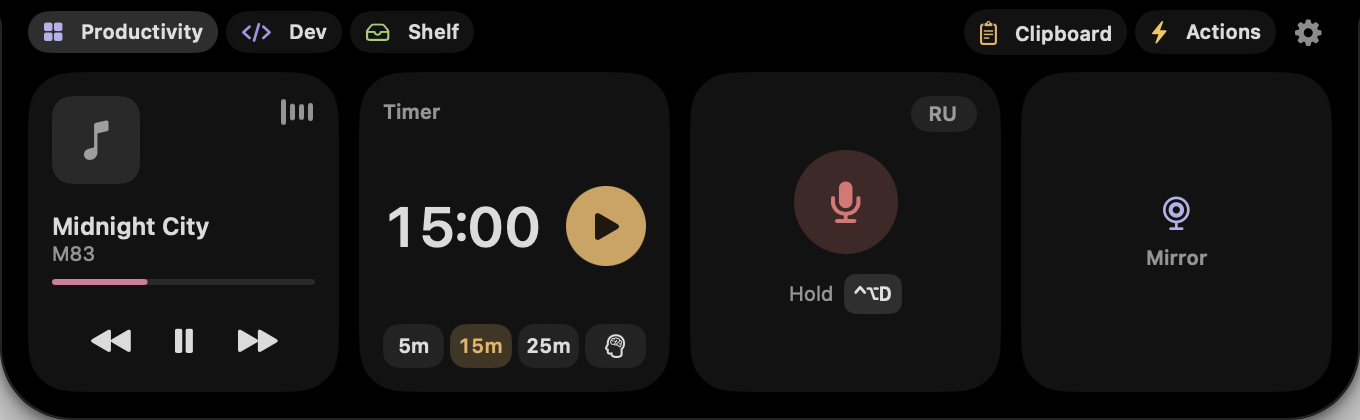
Music, a timer, a build or a coding agent sit in small wings either side of the notch. Several at once, each in its own color.
Point at the island and it leans out a little: a line slides out with what’s under the pointer, the track, the time left, the agent, or “Open ait” when nothing runs.
Everything at once, with controls, plus your tools. Move away and it folds back up on its own. Rather open it on hover? One switch in Settings.
Features
No more digging through windows to see what’s playing, what your coding agent is up to or whether the build finished. Ait shows it at the top of the screen, then gets out of the way.
Artwork, track, progress and controls for Apple Music and Spotify, and, with the experimental System Now Playing, YouTube or any other site in your browser. The island even picks up the colors of the cover.
Claude Code, Codex and Cursor sessions show up live: what they’re doing, waiting for approval or done, with session time and usage limits.
On external monitors and older Macs, Ait brings a virtual island to the top of the screen you’re working on.
Hold ⌃⌥D in any app, speak, let go: the text appears where your cursor is. Hold ⌃⌥T to translate it first. Recognized and translated on your Mac; audio is never saved.
Open Ait, your clipboard history or any tool from any app, and press again to close. Set your own in Settings.
Pomodoro in the Timer: 25 minutes of focus, then a break that starts on its own.
AirDrop what’s on the File Shelf, or add files from Finder with a right-click: Add to ait Shelf.
Narrow, standard or wide. Wings beside the camera or just the camera. A faint outline so it stands out from the menu bar, and a glow in your accent color while something runs, or always, or never.
Drag widgets into place, make one small or medium, add or remove them. Reset brings back the standard layout.
Tools
Hover to peek, click to open. Six small tools live right under the camera, and the ones you use most are a shortcut away from any app.
Countdowns that survive a restart, and Pomodoro with breaks that start on their own.
A quick look at yourself before a call. The camera turns on only when you open it.
Dictate into any app, or translate as you speak. Recognized and translated on your Mac.
Everything you copied, searchable, a shortcut away from any app.
Park files for a moment, drag them out where you need them, or AirDrop them.
Your apps, links and Shortcuts, one click under the camera.
For developers
Claude Code, Codex and Cursor report to the island while they work. See what an agent is doing, the moment it needs your approval or finishes, and how much of your usage limit is left, without switching windows.
Working, waiting for you or done, with the stage of the turn: Thinking, Reading, Editing or Running Command. Approval outranks everything else in the island, and with several sessions the one that needs you comes first.
Your 5-hour and weekly windows with the time they reset, highlighted as you near the limit, and how full the session’s context window is.
Settings → Developer → Connect. Ait adds its hooks to the agent’s settings and keeps a backup of the original file. It receives only states, limits and the project folder: no prompts, code or credentials. Ait observes; you approve in the agent.
Failed checks, requested reviews and merges, with the one that needs you on the Dev page. Uses your GitHub CLI sign-in; Ait stores no token and changes nothing.
Any build, test or deploy script can show progress and a result in the island.
Private. Native. Light.
No accounts, no tracking. Ait goes online only to check for updates and, if you turn it on, to read GitHub. Dictation runs on your Mac and audio is never saved.
Event-driven Swift, SwiftUI and AppKit. No web views, no Electron. Built to run all day without you noticing.
Ait asks for camera, microphone or automation access only when you use the feature that needs it. Say no and everything else keeps working.
Pricing
Free while Ait is in beta, then a lifetime license. No subscription, no account. Beta testers get theirs free.
Free
While Ait is in public beta
$24.99 $19
Launch price, paid once
FAQ
Yes, during the public beta: download it and use everything, with no account. After the beta Ait stays free to use, and Ait Lifetime — a one-time purchase, $19 at launch instead of $24.99 — unlocks the Pro widgets and features. Beta testers get a free Lifetime key. There will be no subscription.
Not yet. Ait is in public beta: it’s signed and notarized and fine for everyday use, but some features are new and things may change or break between versions. Updates arrive through Check for Updates… in the menu bar.
Any Mac with macOS 14 Sonoma or later, Apple silicon or Intel. MacBooks with a camera housing get the island around the notch. Every other display gets a virtual island at the top.
Ait is signed with an Apple Developer ID and notarized by Apple, so macOS opens it without warnings. The SHA-256 of version 0.8.0 is 6caf8c01d91c668f3258bab0ffc09ad6bf1ea239696fcdec2edc7885482c1fa4.
No. The island never takes keyboard focus, and clicks go straight through to the menu bar around it. It only grows when something happens or when you hover it.
Open the downloaded DMG, drag Ait to Applications and open it. Turn on Launch at Login in Settings to keep it around.

Free, native, private. Ready in a minute.
Download for MacPublic beta · Version 0.8.0 · 6.6 MB · macOS 14 or later · Notarized by Apple